

Introduction
Creative work should feel smooth and inspiring. But for many teams, it feels confusing and stressful instead. Designers use one app, writers use another, and marketers track results somewhere else. Team members switch between tools all day, trying to keep up with messages, files, and deadlines. This wastes time and makes simple projects harder than they should be.
In 2026, creative teams need a better way to work together. They need one place where ideas, files, feedback, and tasks can live side by side. That is where Pinaflux helps. It is a flexible digital workspace designed for graphic designers, writers, videographers, and digital marketers. It adjusts to different creative styles and makes teamwork easier. In this article, you will learn how it works, why it matters, and how it can improve your daily workflow.
What is Pinaflux?
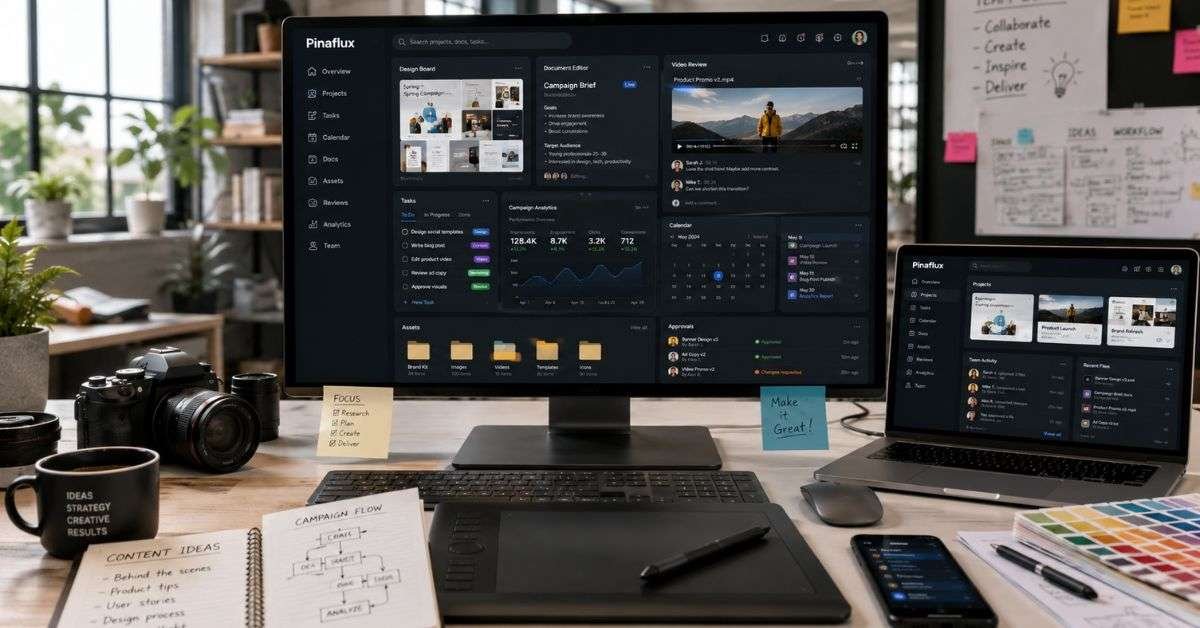
Pinaflux is a cloud-based creative workspace that brings different types of creative work into one place.
It allows teams to:
- Create content
- Share files
- Give feedback
- Manage tasks
- Track campaigns
All inside one flexible system. Unlike many project management tools, It does not use a fixed layout. You can change the workspace based on your role. A designer can focus on visuals. A writer can focus on text. A marketer can focus on results. This makes it useful for teams that handle many types of projects at the same time.
Why Creative Teams Need a Flexible Workspace in 2026
Creative work has changed a lot. Many teams now work remotely. Some members may live in different cities or even different countries. Video content is growing fast. Short-form content is everywhere. Marketing campaigns move quickly. When tools are not connected, problems happen:
- Files get lost
- Feedback is unclear
- Deadlines are missed
- Team members feel stressed
A flexible workspace solves this by keeping everything organized in one place. In 2026, speed and teamwork matter more than ever. A system that adapts to your workflow helps you stay ahead.
Key Features of Pinaflux
The power of Pinaflux comes from its flexibility and smart design.
- Custom Workspaces
Each user can adjust the layout. For example:
- Designers can open visual boards.
- Writers can use structured document views.
- Marketers can open campaign dashboards.
This saves time because you only see what you need.
- Shared Asset Library
All files are saved in one central location. Team members can:
- Upload images and videos
- Tag files for easy search
- Track versions
Stop rummaging through your emails for the latest file.
- Real-Time Collaboration
Team members can comment directly on:
- Images
- Videos
- Documents
This keeps feedback clear and simple.
- Workflow Automation
Routine tasks can be automated, such as:
- Sending approval requests
- Notifying team members
- Moving projects to the next stage
This reduces manual work and saves time.
How Pinaflux Helps Different Creative Roles

One reason teams choose it is that it works well for many types of professionals.
Graphic Designers:
Designers can:
- Share drafts quickly
- Get comments directly on visuals
- Compare different versions
This makes revisions faster and clearer.
Writers and Content Creators:
Writers can:
- Draft content
- Edit in real time
- Track changes
- Organize articles by project
This helps to keep content organized and easy to handle.
Videographers:
Video teams can:
- Upload large media files
- Get timestamp feedback
- Manage editing stages
Feedback on videos becomes more detailed and helpful.
Digital Marketers:
Marketers can:
- Track campaign progress
- View performance data
- Coordinate content across platforms
This connects creative work with real results.
Comparison: Pinaflux vs Traditional Tools
Many teams use separate tools for tasks, design, and file storage. Let’s compare.
| Feature | Traditional Tools (Multiple Apps) | Pinaflux |
| Centralized File Storage | No | Yes |
| Role-Based Workspace | Limited | Yes |
| Real-Time Feedback | Sometimes | Yes |
| Workflow Automation | Basic | Advanced |
| All-in-One Collaboration | No | Yes |
With traditional tools, you often switch between 3–5 apps daily. With it, most work happens in one place. This reduces confusion and saves hours each week.
Main Benefits of Using Pinaflux
Here are the biggest advantages teams notice:
- Better organization
- Faster approvals
- Clear communication
- Fewer missed deadlines
- Stronger teamwork
Because everything lives in one system, projects move smoothly from idea to launch. Teams also report less stress because they don’t need to search for files or guess which version is final.
How It Improves Productivity
Productivity increases when teams:
- Spend less time switching apps
- Receive clear feedback
- Avoid repeated work
- Automate simple tasks
For example, instead of emailing a design for approval, a designer can upload it inside Pinaflux and tag the manager. The manager gets notified instantly and can comment directly on the design. This simple process removes long email chains. Over time, these small improvements add up to big time savings.
Real Example: A Marketing Campaign Workflow
Imagine a digital marketing team launching a new product.
- The writer drafts website copy.
- The designer creates graphics.
- The videographer edits a short promo video.
- The marketer plans social media posts.
Using Pinaflux, all of this happens in one connected workspace.
Everyone can see:
- Project status
- Feedback
- Deadlines
- Final files
This prevents delays and keeps the campaign on track.
Security and Cloud Performance
In 2026, data safety is very important. Creative teams handle:
- Client information
- Brand assets
- Marketing strategies
Pinaflux uses secure cloud technology. This helps protect files and control who can access them. Teams can set permissions so only the right people see certain content. Cloud storage also allows large files, like videos, to load quickly and stay accessible from anywhere.
Feature Overview Table
Below is a simple breakdown of how it supports creative work.
| Creative Need | How Pinaflux Solves It | Result for Teams |
| File Organization | Central asset library | Easy file access |
| Team Communication | In-context comments | Clear feedback |
| Workflow Management | Custom stages & automation | Faster project flow |
| Multi-Role Collaboration | Role-based workspace views | Better teamwork |
| Remote Access | Cloud-based system | Work from anywhere |
This table shows how one system replaces many scattered tools.
How to Get Started with Pinaflux
Starting with Pinaflux is simple if you follow these steps:
- Review your current tools.
- Identify workflow problems.
- Set up role-based workspaces.
- Upload existing projects.
- Train your team.
Change can feel difficult at first. But once your team gets used to a unified system, work becomes much smoother. Start with one project. Test the system. Then expand to other campaigns.
Who Should Use Pinaflux?
It is ideal for:
- Creative agencies
- Marketing teams
- Freelancers working with clients
- Content production teams
- Startups building brand assets
If your team works with design, writing, video, and marketing together, this platform can simplify your daily tasks. It is especially useful for teams that feel overwhelmed by too many disconnected tools.
FAQs
What is Pinaflux used for?
It is used to manage creative projects, files, and collaboration in one workspace.
Is it good for remote teams?
Yes it is cloud based and offers real time collaboration.
Can designers and writers use it together?
Yes, it adapts to different creative roles.
Does it store large video files?
Yes, it supports media uploads and organized storage.
Is it hard to learn?
No, most teams find it simple and easy to adjust to.
Conclusion
Creative work should feel exciting, not chaotic. When teams use too many separate tools, projects slow down. Files get lost. Feedback becomes confusing. Deadlines become stressful. Pinaflux solves these problems by offering a flexible, all-in-one workspace built for designers, writers, videographers, and marketers. It adapts to different creative workflows and keeps everything organized in one place.
If your team wants better communication, faster approvals, and smoother collaboration, it may be time to try a smarter system. Start by reviewing your current workflow today. Then explore how it can simplify your creative process and help your team do its best work in 2026.